
As your business grows, so does the demand on its operations. What began as a simple workflow can evolve into a tangled web of manual tasks, siloed data, and inefficient handoffs.
Enterprise process automation untangles that mess. It sits a level above task automation and single-process automation. Instead of automating one job, or one department’s workflow, it connects work, data, and systems across the whole organization: the difference between automating individual tasks and automating the business itself.
Below, we cover what enterprise process automation is, how it differs from the narrower forms of automation it builds on, and how a well-executed strategy leads to a more agile, efficient, and intelligent business.
Enterprise process automation connects and governs work across an entire organization, going beyond task automation (RPA) and single-process automation (BPA).
Task-level automation creates “automation islands”: individual jobs are automated, but the handoffs between systems still are not. Orchestration is what joins them into one governed process.
The automation spectrum runs from basic rules-based tasks through BPA, integration automation, and RPA to AI-driven intelligent automation.
The main benefits are efficiency, cost reduction, fewer errors, better decisions from real-time data, and the ability to scale without adding headcount.
Analysts describe the shift toward a single orchestrating layer as Business Orchestration and Automation Technologies (BOAT).
Enterprise process automation is the use of technology to connect and automate business processes across an entire organization. Its goal is to move beyond isolated, departmental automation and create a cohesive, interconnected ecosystem where workflows integrate technology, AI, people, and existing systems harmoniously.
Instead of a collection of standalone software and manually connected workflows, enterprise process automation orchestrates the flow of work, data, and information across departments and systems with a master software layer.
This structure integrates AI-powered tools and other automation technology, such as robotic process automation (RPA), with customizable workflows across platforms to create a unified system. It empowers businesses to manage everything from simple repetitive tasks to demanding, multi-step workflows with greater speed and accuracy.
Where single-process automation optimizes one workflow end to end, enterprise process automation coordinates many of them at once, across the systems and teams they touch.
Enterprise automation spans a spectrum of increasing capability and scope. Understanding the different types it encompasses is essential for crafting an effective enterprise automation strategy:
Basic automation: The simplest form, often involving rules-based tasks operating in an individual software. Examples include spreadsheet formulas that automatically calculate totals or email rules that sort incoming messages. This type of automation handles individual tasks rather than entire processes.
Business process automation (BPA): This goes a step further, focusing on streamlining demanding, multi-step workflows that span different departments. BPA aims to manage the entire business process instead of just a single task — Flowable's AI Business Process Automation extends this with AI-assisted execution and monitoring. For example, an automated employee onboarding process that moves from HR to IT and back, ensuring all steps, from contract signing to equipment setup, are completed and optimized in one flow.
Integration automation: This connects different software and systems via application programming interfaces (APIs) so data can flow freely between them. It removes manual data entry and handoffs, creating a connected IT environment.
Robotic process automation (RPA): RPA uses software bots to mimic human actions for repetitive, rule-based tasks. These bots move across applications, enter data, and handle jobs such as processing invoices or updating customer records, freeing human employees from manual, intensive workloads.
Intelligent automation: This represents the pinnacle of automation, using AI and machine learning to handle unstructured data, adapt over time, and make data-driven decisions. Unlike RPA bots, which follow a rigid script, intelligent automation can read and classify documents, understand natural language, and learn from its own actions, making it ideal for tasks like analyzing customer feedback or processing exception-heavy claims and requests with dynamic automation and AI agent integration.
The scale of the opportunity is significant. McKinsey Global Institute estimates that today’s technology could automate activities accounting for around 57 percent of US work hours. An effective enterprise process automation software can turn that potential into measurable advantage, changing how a company operates and laying the groundwork for a more efficient and adaptable organization.
This strategic shift delivers a wave of benefits. By automating manual tasks, you increase efficiency and productivity, freeing your employees from tedious, repetitive work. That lets them focus on higher-value, strategic tasks that require critical thinking and creativity. At the same time, the reduction in manual effort and human error leads to cost reduction and a higher degree of accuracy and consistency across all operations.
The cost of fragmentation is easy to underestimate. Harvard Business Review research found that the average digital worker toggles between applications and websites nearly 1,200 times a day, and loses close to four hours a week, about 9 percent of their time, just reorienting after each switch. That is the tax of limited automation operating in disconnected silos, where different departments automate their own tasks using individual software platforms. A marketing team might use one tool for email campaigns, sales another to log calls, and finance a third to process invoices.
The problem is the lack of communication between these systems. When a process needs to move from one department to another, a human is still required to transfer data, re-enter information, and manage the handoff. An enterprise-level orchestration platform acts as a master software layer that connects all these disparate systems. It provides a single point of control to map and manage entire workflows from end to end, so data flows automatically between
departments and software. This eliminates manual handoffs, reduces errors, and turns fragmented tasks into a single, connected business process.
Master BPA platforms also enhance internal communication. When workflows are standardized, the handoffs between departments become smoother, improving collaboration and breaking down the silos that slow an organization down at scale. An enterprise BPA platform provides data-driven insights by collecting real-time information on process performance, letting leaders make better, more informed decisions about bottlenecks and areas for improvement.
A system that can handle end-to-end automation and entire process management is built for growth. Automated processes scale to accommodate business expansion without a
proportional increase in headcount, making it easier to handle a surge in customer demand or expand into new markets. Enterprise automation is a long-term investment in your company’s future, ensuring it is ready to meet the challenges of tomorrow.
Enterprise automation is a long-term investment in your company's future, ensuring it's ready to meet the challenges of tomorrow
While the benefits are clear, implementing enterprise process automation still comes with challenges. Common hurdles include high initial costs, employee resistance to change, hard-to-automate processes that require expert workflow development, and potential security risks that need to be covered.
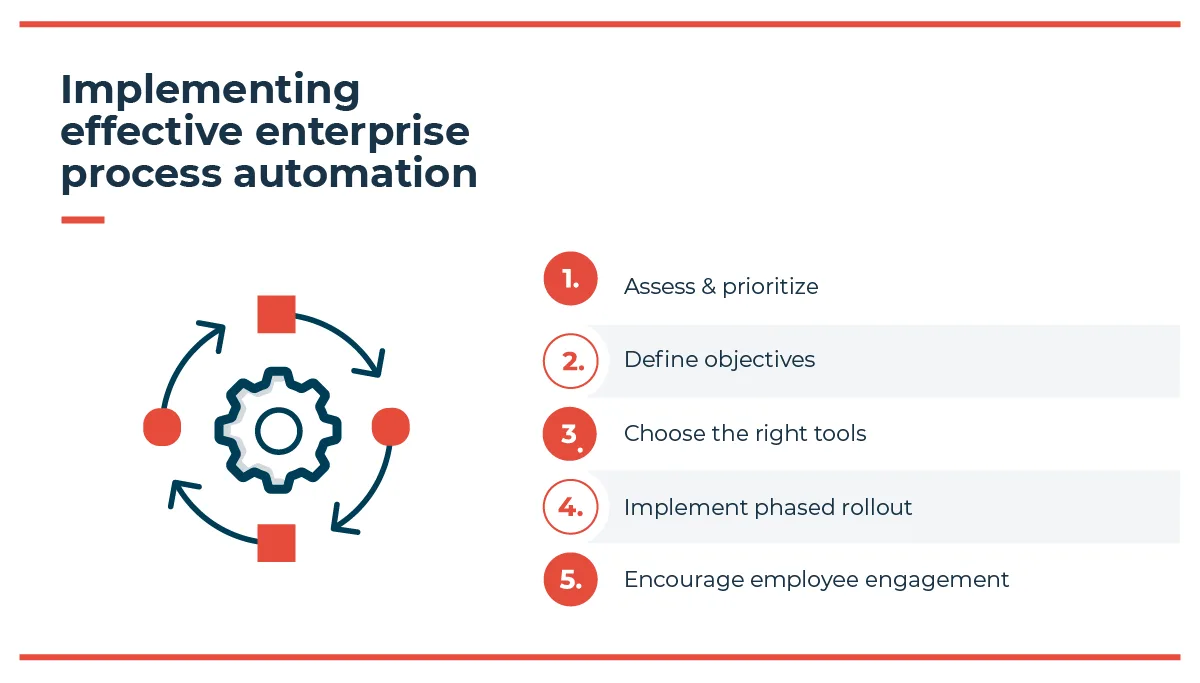

To overcome these barriers, a strategic and phased approach is crucial.
Assess and prioritize: Get a clear picture of your existing processes. Identify and map out workflows to pinpoint the best candidates for automation. Look for tasks that are repetitive, rules-based, high-stakes, regulated, and have a high impact on your business.
Define objectives: Set clear, measurable goals for what you want to achieve. Are you aiming to reduce processing time, cut costs, or improve data accuracy? Specific targets will guide your strategy.
Choose the right tools: Selecting the right platform is critical. Look for a solution that aligns with your needs and automation spectrum, integrates with your existing systems, and offers the flexibility to scale.
Implement a phased rollout: Don’t try to automate everything at once. Start with a pilot project to prove the value of the technology and build momentum. A successful pilot can serve as a model for wider adoption.
Encourage employee engagement and training: Involve employees early. Communicate the benefits and provide comprehensive training. When employees are part of the solution and understand how it enables their performance, they are better positioned to embrace the change.
Flowable’s core philosophy for enterprise automation is end-to-end process orchestration. Task-level bots automate individual steps, but they don’t talk to each other. Automate enough of them in isolation and you get automation islands, where every job is handled yet the handoffs between them still are not. Orchestration is what turns those islands into a single governed process.
Analysts have a name for this shift. Gartner calls it Business Orchestration and Automation Technologies, or BOAT: the move from stitching point tools together toward one layer that coordinates people, systems, and AI across the whole organization.
The Flowable Agentic Case Platform is built for that orchestrating role. It is a unified environment designed to coordinate the demanding interplay between people, business processes, and AI in everyday work, rather than a tool for automating one task at a time. Every component works together in one system instead of a series of disconnected jobs, which helps businesses build more resilient and effective operations.
AI agents run inside that orchestration layer. Flowable treats them as first-class participants that are configured and governed alongside human work and traditional workflows, so the process itself stays in control of what the AI is allowed to do. Process control is what makes AI dependable to run on high-stakes work at enterprise scale; the AI capability only matters once the process governs it.
When work carries real consequences, human judgment belongs in the process by design. Flowable makes human-in-the-loop steps a first-class part of the workflow at the points where a decision needs a person, rather than a fallback bolted on when automation reaches its limit.
Any orchestration layer should be judged on whether it is built on open standards. Flowable is built on BPMN (Business Process Model and Notation), CMMN (Case Management Model and Notation), and DMN (Decision Model and Notation).
This is worth asking any vendor about: open standards keep the architecture flexible and future-proof, reduce the risk of vendor lock-in, and simplify integration with existing legacy systems and enterprise applications. CMMN in particular supports the kind of adaptive case work that most task-automation tools cannot model at all.
That case-management foundation is what lets Flowable handle exception-driven, evolving work. Beyond rigid, linear workflows, dynamic case management adapts automation on the go. Industries like insurance, finance, and healthcare regularly run into cases with unexpected workflow exceptions, where a predefined path is not enough.
Flowable combines the structure of defined processes with the flexibility to handle ad-hoc activities and exceptions, so even the most demanding cases reach a smooth, effective outcome.
Flowable also supports both technical and non-technical users through an intuitive visual interface, so business teams can build and modify workflows without deep technical expertise. That accessibility makes automation more democratized and agile, and makes Flowable an adaptable choice for organizations ready to take their automation strategy to the next level.
RPA automates individual, rule-based tasks by mimicking human actions inside existing applications. Enterprise process automation works a level up, connecting and governing whole processes across departments and systems, including the RPA bots themselves. RPA automates a step; enterprise process automation orchestrates the process that step belongs to.
Business process automation streamlines a single multi-step process, often within one department, such as employee onboarding. Enterprise process automation coordinates many processes across the entire organization, connecting the data and handoffs between them into one governed system.
It varies with scope. Most organizations start with a phased rollout: a pilot on one high-value process to prove the approach, then wider adoption as the platform and internal buy-in grow. A focused pilot can deliver results in weeks, while an organization-wide rollout is an ongoing program rather than a one-off project.
See Flowable’s AI-driven process automation in action. Book a tailored demo with Flowable’s automation experts and see how it can fit your business today.
Business process management software covers very different tools in 2026. See how the category shifted towards BOAT and what buyers should evaluate.
Client lifecycle management in banking goes beyond onboarding. See how case management keeps client context intact through KYC, reviews and offboarding.
n agentic workflow is more than a multi-agent diagram. See what the standard patterns omit once workflows meet exceptions, oversight, and audit requirements. Primary keyword: agentic workflow