
A decision table puts business rules into rows and columns, showing which result applies when certain conditions are met. It turns if-then logic into a format that business analysts, operations teams and developers can read and discuss.
For business decision automation, these tables can form part of Decision Model and Notation (DMN), an OMG standard for modelling business decisions.
We’ll use a worked insurance example to show how a decision table is structured, how its rules fit together and how it supports automated decisions.
Each row in a decision table represents a rule.
Input conditions determine which output applies.
DMN adds a formal structure, including a hit policy.
The logic can be understood without reading application code.
A decision table is a way of laying out decision logic in rows and columns. Instead of writing the rules as a long block of if-then logic, you can see the conditions that matter and the result each combination should produce. If you’re familiar with decision trees, the concept is quite similar.
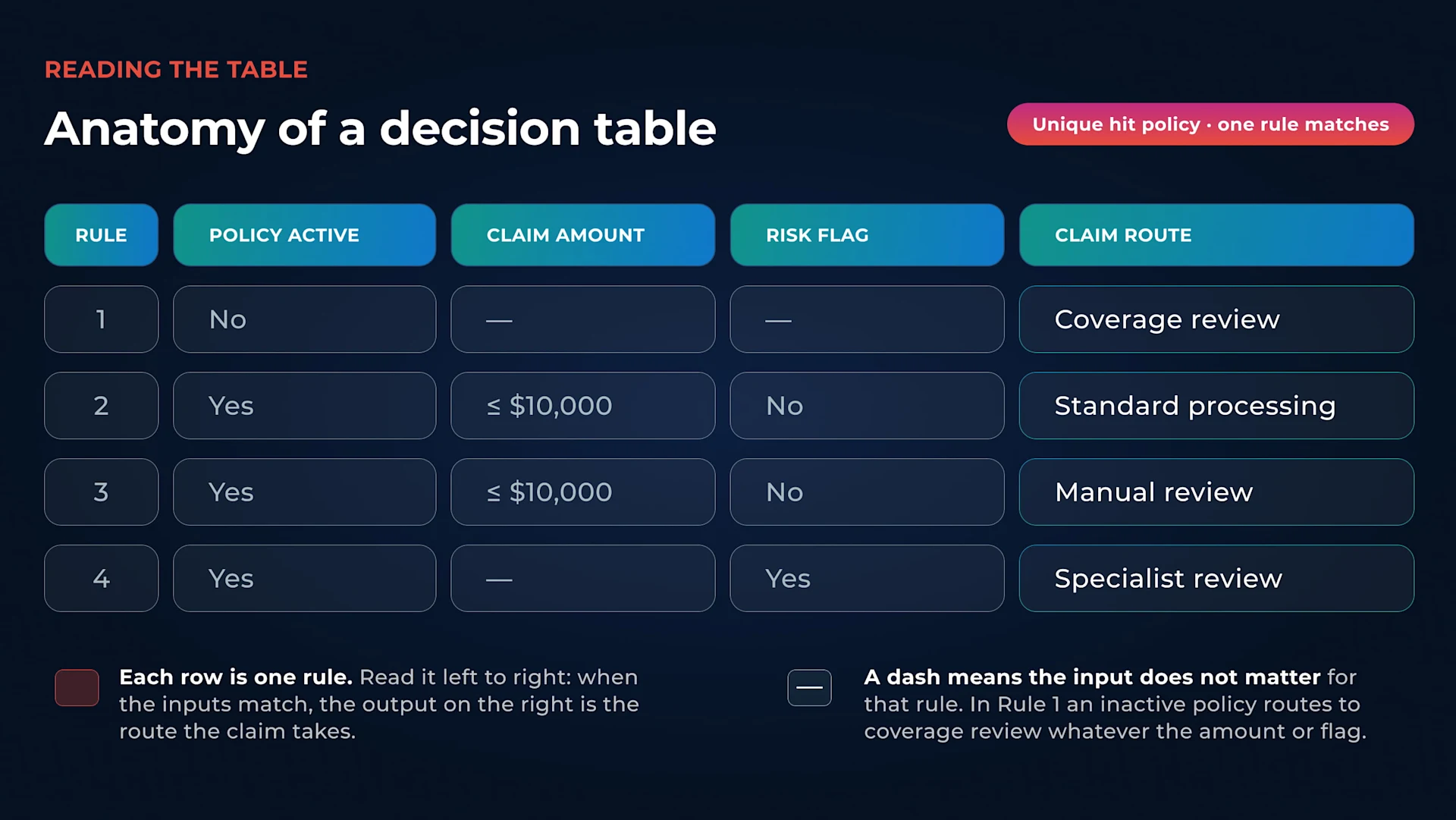
Annotated decision table for insurance claim routing, showing three input columns (policy active, claim amount, risk flag) and one output column (claim route) across four rules.
Each row normally represents one rule. The columns hold the information used to make the decision and the outcome that follows from it. In a DMN decision table, the input conditions sit on the left and the output values sit on the right. A hit policy controls how the table should behave if more than one rule could apply.
For example, an insurer might send an active policy with a lower-value claim through the standard route. Once things like risk flags or different claim amounts come into play, writing every possible outcome out in sentences gets messy fast.
That is where the table format helps. A business analyst can inspect the rules without having to work through application code, while technical teams still have a structured form of rule-based decisioning to work with.
Decision tables are also one way a business rules engine can represent and execute business rules. Low-code tools can make them easier to edit, but the basic idea is much simpler: show the conditions, show the result, and make the logic visible.
Imagine an insurer working out where a claim should go next. The figures below are just there to show how the rules work, not to reflect any real insurer’s thresholds or processes.
The decision is simple: where should this claim go next?
To answer it, the table uses three inputs: whether the policy is active, the value of the claim, and whether a risk flag has been raised. The output is the route the claim should take.
Hit policy: U (Unique)
Rule | Policy active | Claim amount | Risk flag | Claim route |
1 | No | - | - | Coverage review |
2 | Yes | ≤ $10,000 | No | Standard processing |
3 | Yes | > $10,000 | No | Manual review |
4 | Yes | - | Yes | Specialist review |
The first three decision columns are the input clauses: the things the table checks before reaching a decision. Here, they show whether the policy is active, how much the claim is worth and whether there is a risk flag. The final column is the output clause: the result the table gives when those conditions match a rule.
Rule 2, for example, applies when the policy is active, the claim is worth $10,000 or less, and there is no risk flag. The result is standard processing.
A dash means that input does not matter for that rule. In Rule 1, an inactive policy leads to the same result regardless of the claim amount or risk flag.
The U above the table stands for the Unique hit policy. In DMN, a hit policy determines how a decision table should behave when its rules are evaluated.
Under Unique, the rules are designed so that only one can match a particular set of inputs. The DMN specification lists Unique as the default hit policy, and Flowable’s Decision Editor supports it for tables where rules should not overlap.
Here, an inactive policy goes to coverage review. An active policy with a risk flag goes to specialist review. Where the policy is active and there is no flag, the claim amount determines which of the remaining routes applies.
That turns several pieces of business logic into one table that can be checked row by row.
Building a decision table follows the same four steps, whatever the domain.
1. Start with the decision, not the rules. Know the output before you touch the inputs. In the insurance example above, the question is simply: where should this claim go? Starting here stops the table from growing into something much bigger than it needs to be.
2. Identify the inputs that actually change the answer. For the claim-routing example, policy status, claim amount and a risk flag are enough. Decision tables tend to work well when several rules rely on the same set of criteria.
3. Write down the possible outcomes. That might include standard processing, manual review, specialist review or a coverage review.
4. Check the rules for gaps and overlaps, then set the hit policy. A hit policy determines how many rules are allowed to match the same inputs and which results the table returns. Is there a valid combination that produces no answer? Could two rules match at the same time? Is one of the conditions unnecessary? A gap leaves a valid input combination with no matching rule at all, so the table returns nothing. An overlap does the opposite, it lets more than one rule match, which breaks a Unique hit policy outright. Both are worth checking for before a table is put into use, and the hit policy itself should reflect how the finished rules are meant to behave: if only one rule should ever match, a Unique policy makes sense.
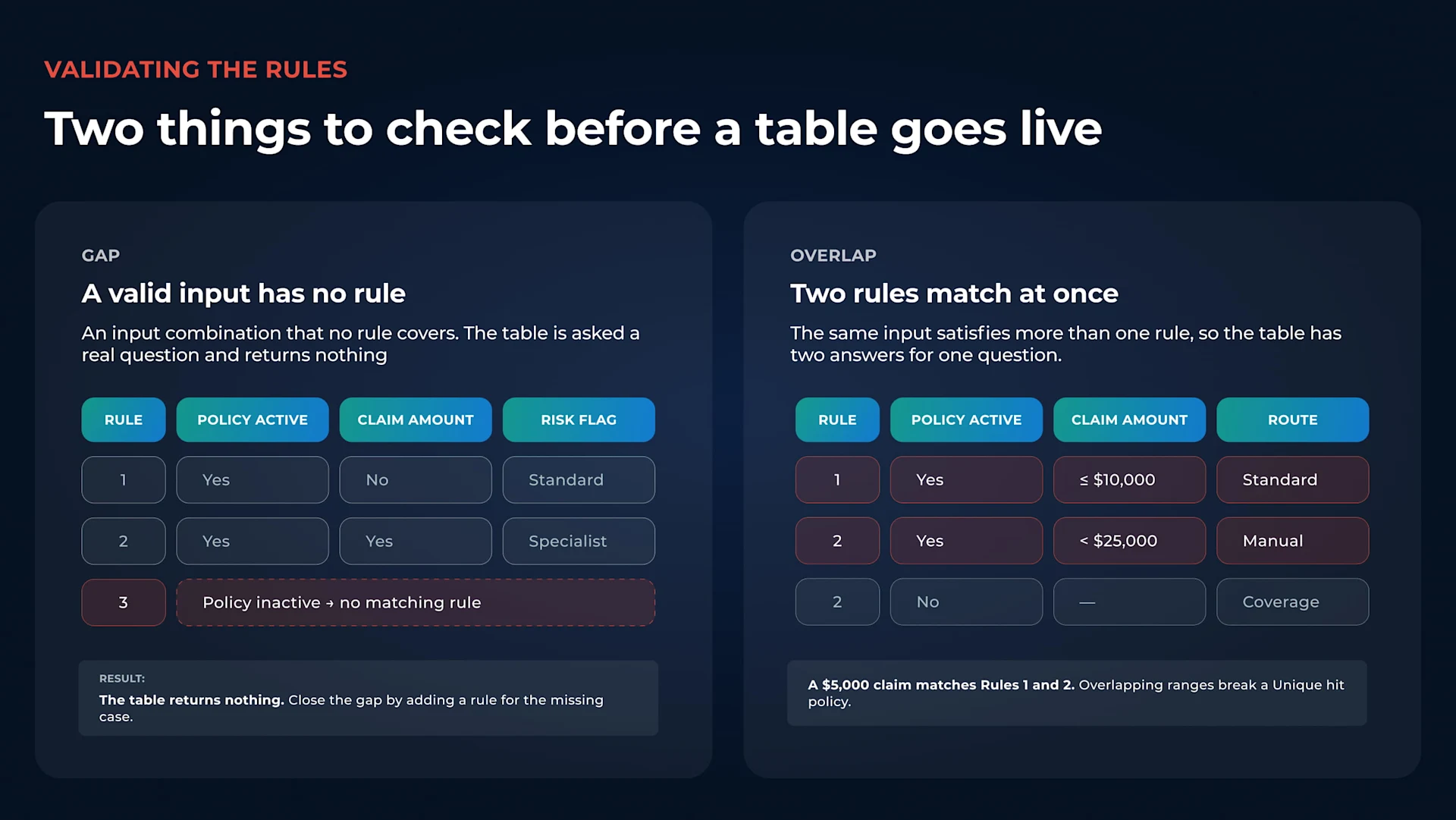
Two decision table panels comparing a gap, where a valid input combination matches no rule and the table returns nothing, with an overlap, where one input matches two rules at once and breaks a Unique hit policy.
Not every decision belongs in a table. Where the rules are highly irregular or rely on lots of exceptions, another format may be easier to manage. Low-code tools can make decision tables easier to build, but the underlying logic still needs to be sound. That shift toward low-code is already underway. Gartner expects developers outside formal IT departments to make up 80% of the low-code user base by this year, up from 60% in 2021.
The term “decision table” is also used in software testing, but it refers to a different job.
A business-rules decision table shows which result should be returned when a particular set of inputs or conditions is met. It is used to define and automate decision logic.
Decision table testing is a black-box testing technique. Test cases are built around combinations of conditions and the actions or outcomes that should follow from them.
The tables can look similar because both organize conditions and results. The difference is what they are for: one defines business logic, while the other helps test whether software behaves as expected.
Decision tables become more useful when the logic follows a common standard. Decision Model and Notation (DMN) was created by the Object Management Group to describe business decisions and business rules in a form that business people and analysts can read.
(Image)
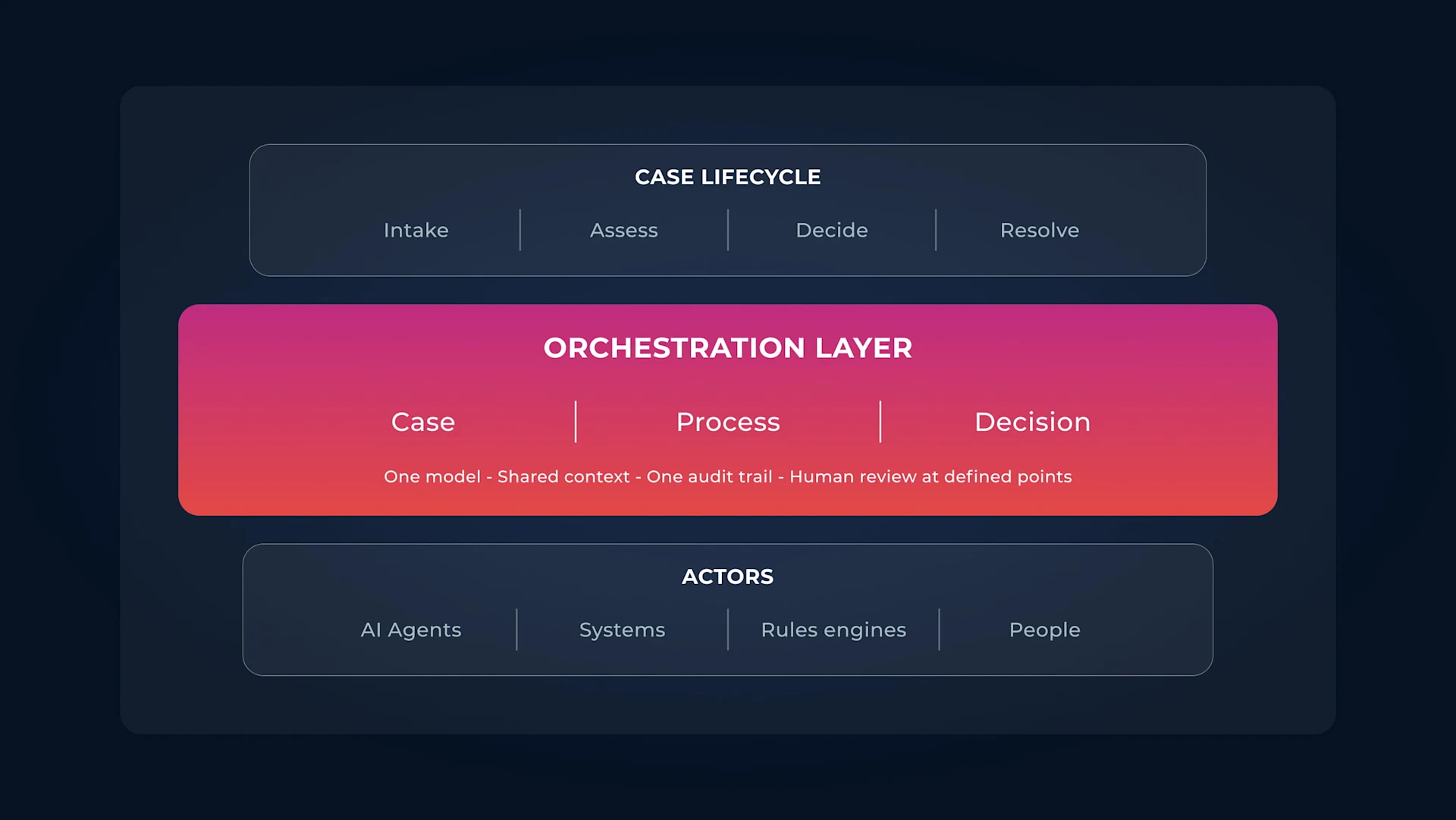
Three-band diagram showing a decision table as one step in a wider claims process and the four resulting routes below, with one shared audit trail and human review at defined points.
DMN also gives that logic enough structure to be validated and executed. In other words, the table does not have to remain a document explaining what should happen. The same decision model can be used by software when a real case reaches that point in a process.
Flowable uses DMN for its decision tables. Its Decision Editor presents the rules in a spreadsheet-style format, with inputs mapped to the information needed for the decision and outputs returning the result. A table can run on its own or be called from a wider process or case.
That matters when the decision is only one part of a larger piece of work. An insurance claim, for example, might reach a decision table during processing, receive a routing result and then continue down the appropriate path.
Not every decision fits neatly into one table either. Where several smaller decisions depend on one another, DMN can use a Decision Requirements Diagram (DRD) to show those relationships and the information each decision needs.
Want to learn more about decision engines? Read our guide to what a decision engine is and how it uses business rules to make decisions in applications and processes.
Ready to put decision tables to work? Book a Flowable demo to explore how you can define business rules and connect decisions to your processes.
A decision table shows the information that matters to a decision and the outcome each combination leads to. Each row is a rule, with the inputs and result set out across the columns.
No. A decision table sets the rules out in a table, while a decision tree maps them through a series of branches. They can describe the same decision, but the structure is different.
Decision table testing is a software-testing technique. Test cases are created around different combinations of conditions and the results the software is expected to produce. It uses a similar table format, but the purpose is testing behavior rather than defining business logic.
Not necessarily. Business rules can often be defined and reviewed in table form without writing application code, which is one reason decision tables work well for business analysts and operations teams. Technical input may still be needed when the decision is integrated into a wider system or process.
Learn what a decision engine is, how DMN separates rules from process logic, and how Flowable governs decisions across every case.

Business process management software covers very different tools in 2026. See how the category shifted towards BOAT and what buyers should evaluate.

Client lifecycle management in banking goes beyond onboarding. See how case management keeps client context intact through KYC, reviews and offboarding.