
AI is a genuinely great technology, and it's reshaping what software can do. An LLM on its own, though, doesn't run your business. That's where orchestration comes in.
The real value shows up when this intelligence is put to work inside something that coordinates the people, systems, and decisions around it, keeps a detailed audit trail, and improves over time. At Flowable, that something is the case and its processes: the harness that has always defined how people, systems, and rules work together, the shared context, the sequencing, the audit trail. The AI agent becomes a new participant in it, handed real work under the same controls you already trusted. This is what sets Flowable apart in regulated industries and high-stakes processes: every decision stays traceable, defensible, and provably under control.
Build, run, operate, improve: that loop is familiar to every Flowable user. Flowable 2026.1 takes it much further as this release deepens autonomy, expands audit insights, adds guardrails and agent evaluators, and opens the platform up to any LLM you choose. And while much of this is built for agents, there's just as much here for teams not reaching for AI yet: this release strengthens the core orchestration everything runs on, makes unstructured data first-class, and brings real lifecycle governance to modeling.
Here's the tour.
This release brings a wave of enterprise-focused AI features to the Agentic Case Platform. The goal throughout is the same: let you put agents to work in your critical business processes, inside a harness where they run in a safe, predictable, audited and controlled way. It starts with the modeling experience in Design, where new functionality supports the modeler at every step.
To generate an app in Design you can use a prompt or a requirements document as input and then a wizard-based generation guides you through each step. It starts with validating the prompt or requirements for gaps, and continues to propose an initial case or process structure and from there defining integration points (REST) and the data structure. When that’s defined the case, process, form, service, agent, data dictionary and other models can be generated.
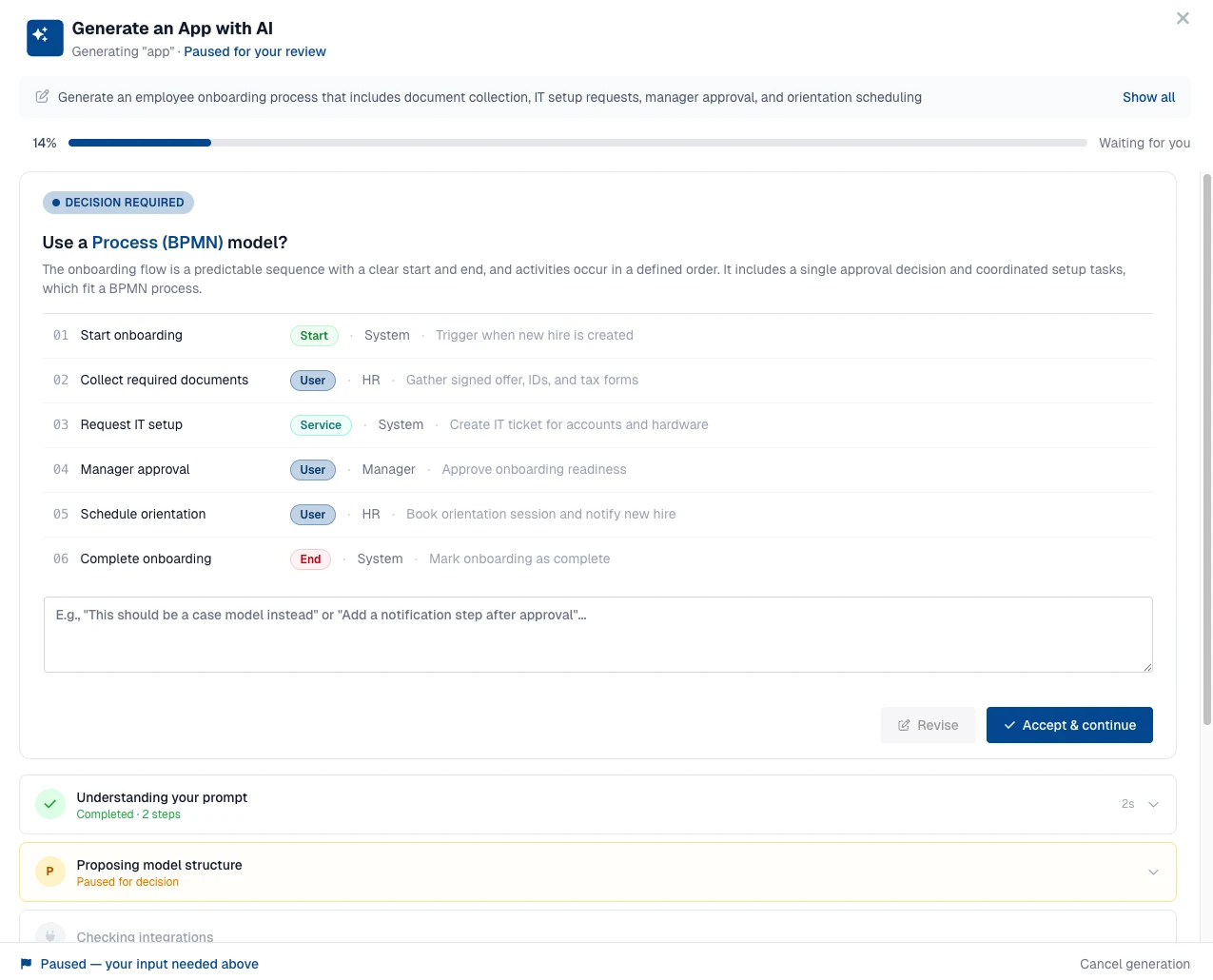

review and accept or revise the proposed model structure
An important part is what comes next. When the models are generated, the verification step begins, to validate the soundness of the models but also generating test models, which is another new feature we’ll discuss further on. Then the test models are executed with Inspect and any problems encountered will be analyzed and a solution will be implemented to run the test models again.
Beyond the app generation, this release also brings AI assistance in the following areas:
An AI prompt helper for agent operations in Design, so elaborate prompts can be drafted and refined inside Design.
AI-assisted generation for REST and script services in the service registry.
AI-assisted scripting for the request and response handler scripts of REST service registry services.
Configurable AI context rules per app generation stage: your own instructions, appended to the system prompt for that stage.
Support for using Anthropic’s Claude as the LLM provider for the AI-assisted modeling chat in Design.
Support for data dictionary types in agent operation input and output.
Now let’s move on to the topic of using MCP tools in agent modeling and exposing the Design modeling and Work runtime features over MCP.
The Model Context Protocol is the emerging standard for connecting agents to tools, and Flowable now speaks it in both directions. Flowable can reach out and call tools hosted on remote MCP servers, and Flowable can present itself as an MCP server so that external AI assistants act on the work and models inside it. These are two independent capabilities, and you can use either on its own.
A remote MCP server is modeled as a service in Flowable Design, which makes its tools part of your business logic. You can call an MCP tool from a process or case as a service task, and you can give an agent the same tool to use during a run.
Discovery happens once, at design time. Flowable Design detects the server’s tools and turns them into operations in the service definition, so you do not transcribe them by hand. From that point the tool set is fixed and deterministic. Agents do not discover or gain new tools at run time, they only see the tools that were captured in the definition. Unwanted tools can be removed from the MCP service definition, and an agent then does not see them at all, so the set of tools an agent can use stays under your control.
Detecting a remote MCP server's tools at design time in Flowable Design, then curating them in the service definition
Now let’s move on to the MCP server topic. Flowable Design exposes its modeling capabilities as MCP tools. A modeler can connect their own assistant and have it help build and change models, the processes, cases, forms and other definitions, from outside the Design UI. Through the Design MCP server, a connected assistant can:
Organise the modeling space: browse and manage workspaces, and the apps and plugins inside them.
Build and change models: create, duplicate, rename, lock and delete models, and edit the content of BPMN processes, CMMN cases, DMN decisions, forms, pages and all other model types.
Validate before publishing: check a model for errors.
Publish: deploy an app to a running environment.
Also, the Agentic Case Platform is exposed as an MCP server to have access to the runtime data of agent, case, process and others. A business user can connect their own assistant and have it act on the work running inside Flowable, without leaving the tools they prefer to work in. Through the Agentic Case Platform MCP server, a connected assistant can:
Work on tasks: find the tasks a user can see, and complete them, including submitting form data and choosing an outcome.
Start and follow work: start a process or a case, and read both running and completed instances.
See what can be started: list the deployed processes and cases available to run.
A vital part in embracing AI agents in your critical business processes is the harness and the predictability in the execution of the agents. Guardrails provide preventive safety controls with content filters, firewalls and policy engines.
Guardrails are a safety layer that wraps the input and output of an agent. Rather than a single mechanism, they are a set of guardrail types you combine to suit each use case, ranging from fast deterministic checks to an LLM-based policy judge, with a clear choice of what happens when one is triggered.
A guardrail can sit on the way in, validating or cleaning what reaches the model, or on the way out, checking what the model produced before it is used. Deterministic and service-based guardrails need no model call at all, and an input guardrail that triggers can skip the LLM call entirely, so unsafe or out-of-scope requests never reach the model in the first place.
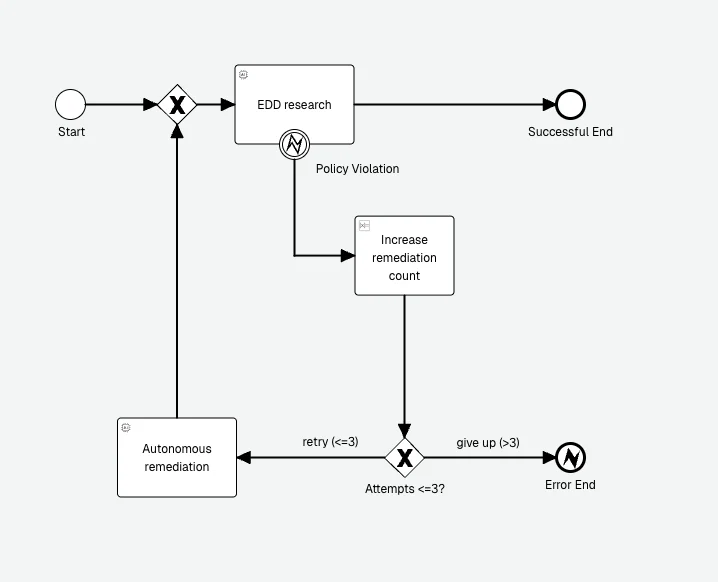
A guardrail policy violation on the EDD agent raises a business error caught by a boundary event. The process increments a remediation count and, while under three attempts, retries through an autonomous remediation step before running the agent again, otherwise it gives up at an error end event.
After the modeling step of your agents is completed, and the agents are running on the Agentic Case Platform with the harness, guardrails, MCP, evaluator and other features, we also need to have full insight. Let’s look at this in the next observability section.
Putting agents into production means being able to answer what an agent did, when, and why, whether you are debugging one run or reporting on thousands. The instance view and timeline give a modeler or support engineer the trace they need to understand a single run, including the agent activity nested inside child processes and cases. The operations dashboards give platform owners the aggregate picture they need to monitor and govern agent activity across the estate.
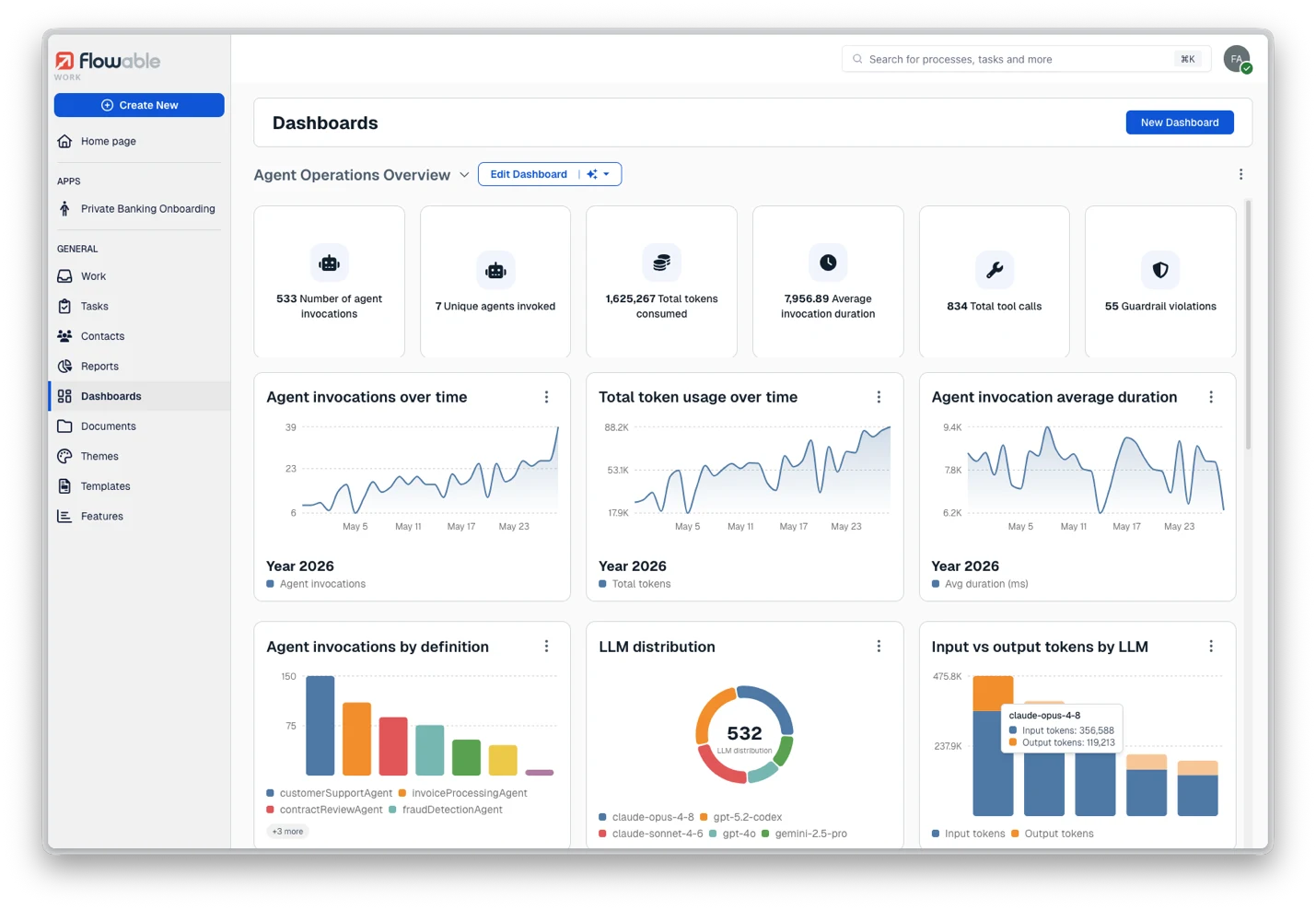
The Agent Operations dashboard in Flowable Work: invocations, token usage, token cost, duration, tool calls and guardrail violations, with per-definition and per-LLM breakdowns
As AI agents take on more work across your processes and cases, understanding how they behave and what they cost becomes essential. The new Agent Operations dashboard gives you a single, real-time view into exactly that. Track the number of invocations, monitor token usage and the token cost it translates to, and keep an eye on execution duration and tool calls to see how your agents spend their time.
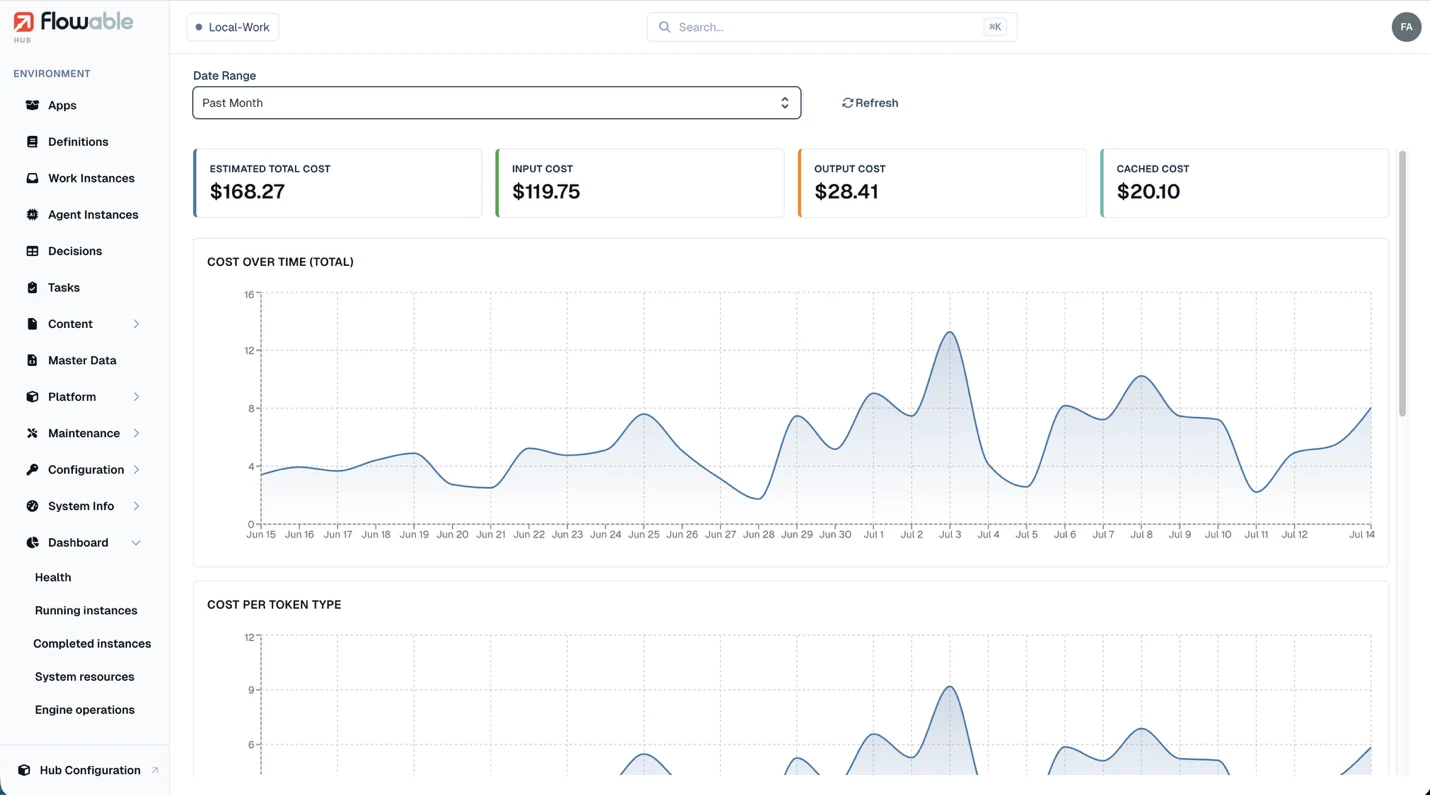
Token cost can be displayed with the available agent dashboard components
Crucially, these dashboards also surface guardrail violations, so you can spot and address unexpected or non-compliant behavior before it becomes a problem. And because one number rarely tells the whole story, every metric can be broken down per agent definition and per LLM. This makes it easy to compare models, pinpoint which agents drive the most activity and cost, and make informed decisions about where to optimize. It's the operational transparency you need to run AI agents in production with confidence.
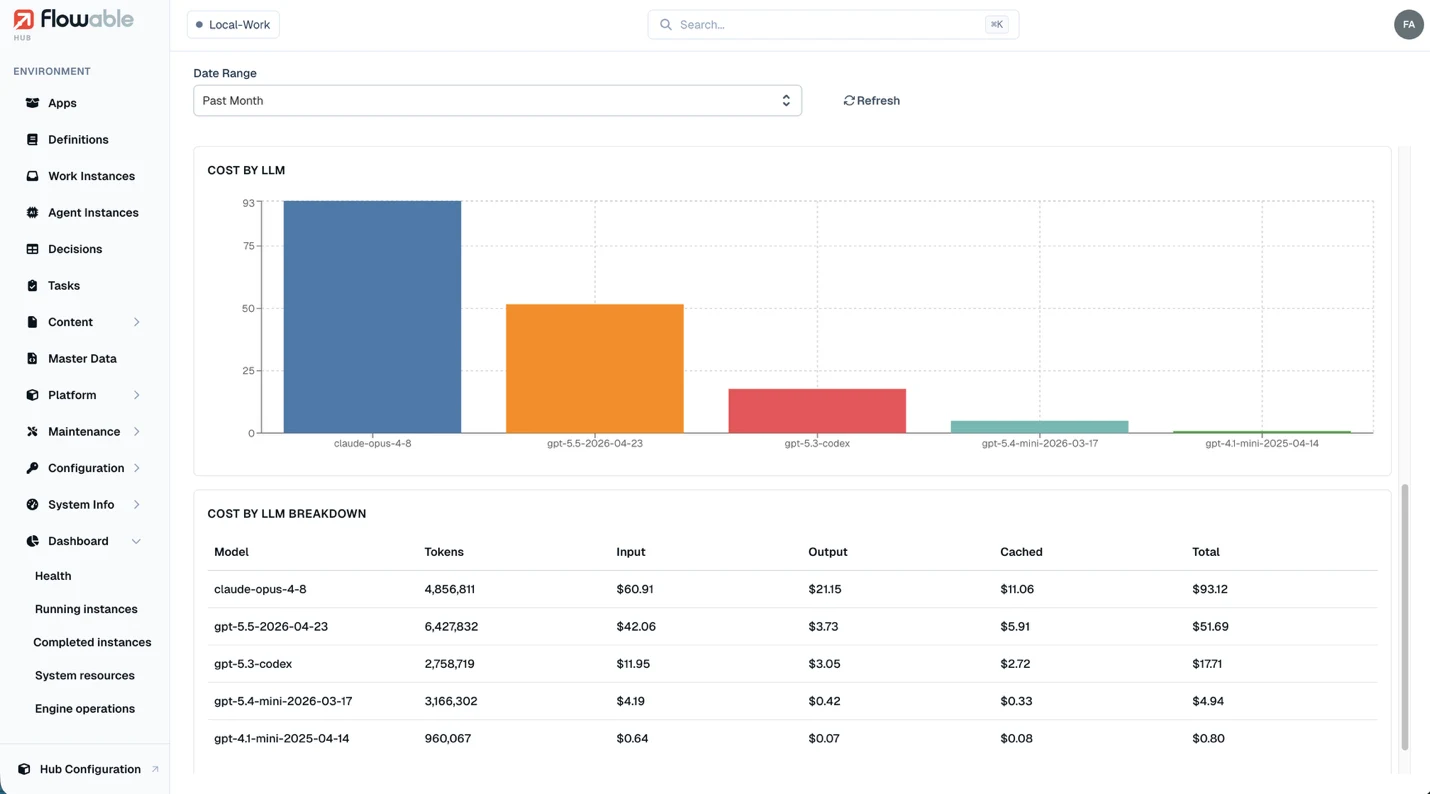
An overview of the token cost per LLM, with input, output and cached tokens mentioned separately
For a full overview of all the Agentic AI and automation features of the 2026.1 release have a look at https://release.flowable.com/2026.1/themes/agentic-ai/. The other features that are also included in this release are:
Agent evaluators: evaluators measure how good an agent’s output is. Where a guardrail decides in the moment whether output is allowed through, an evaluator runs afterwards and scores the result, so you have a continuous, automatic quality signal for your agents.
Open LLM provider support: Run agents on any model, configured centrally and switchable at runtime, from hosted Anthropic and OpenAI to self-hosted and private models.
Document agents: classify incoming documents and extract important metadata. This release adds structured input support, extensive testing options and classification fallback models.
Visual models make it easier for a project team to communicate, from business-focused members through to developers. But working efficiently means the modeling platform and the runtime both have to follow the same clear, controlled process your organization relies on. That's what the following 2026.1 features are for.
You can now author and execute BPMN process and CMMN case tests directly inside Flowable Design, validating how a model behaves before manually publishing it to Flowable Work. Process and case test authoring and execution now live alongside the models themselves, so correctness is something you confirm during modelling rather than after deployment. A test overview brings your tests together in one place, and tests can be imported and exported so they travel with the work.
Testing extends beyond processes and cases. Reusable test definitions also cover service and agent operations, executed per operation right in Design.
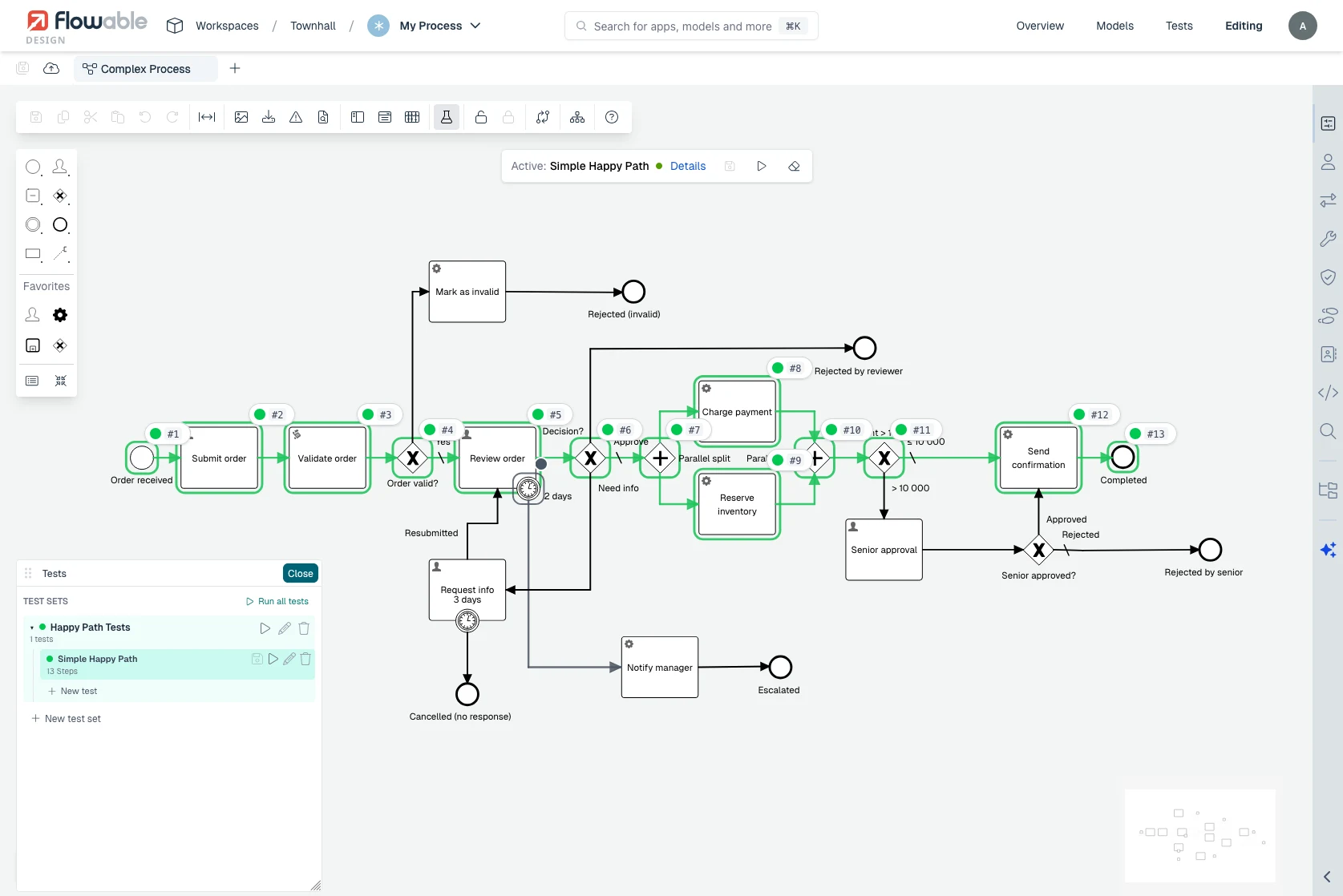
Running a process test in Flowable Design: the test set on the left, and the executed path traced step by step across the model
Flowable Design now connects natively to a Git repository, so you manage your models the way engineering teams manage code. From inside the Design UI you can branch and raise pull requests across processes, decision tables, forms and every other artifact, and review what changed before merging. The development practices your organisation already trusts now apply directly to your process definitions.
To review open changes you use Flowable Design’s model comparison. That is a Design capability in its own right, available with or without Git, and the Git flow uses it for review: it shows model-level differences and a revision-level overview of added, modified and deleted models, so a reviewer sees exactly what changed before approving.
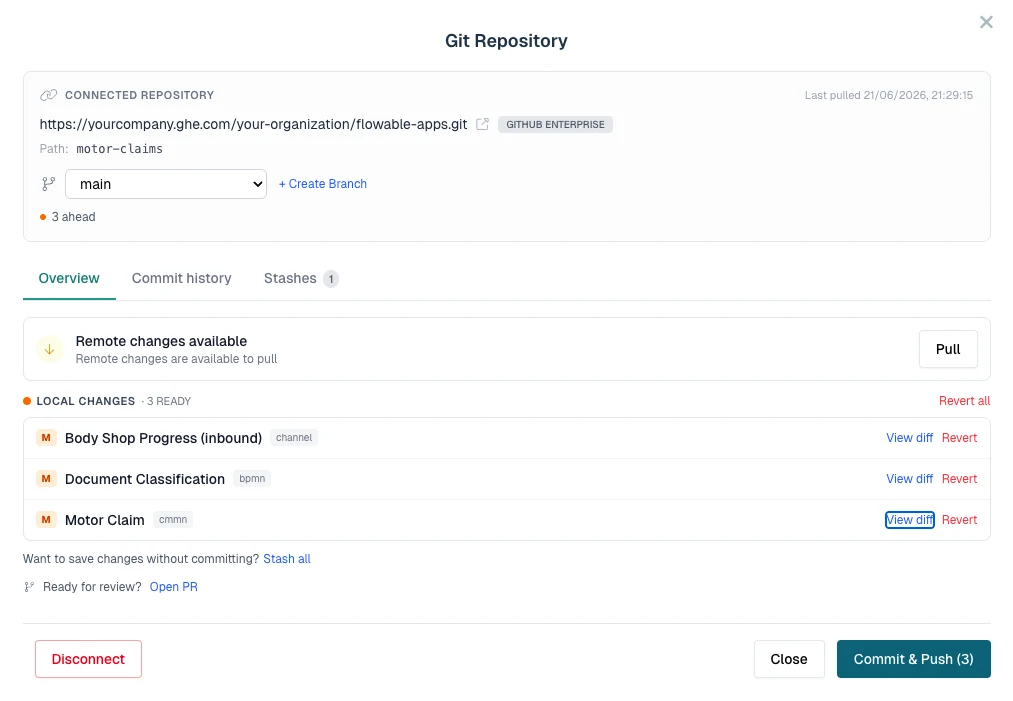
The Git dialog in Flowable Design: branch, pull remote changes, review local changes per model, and commit and push or open a pull request
Flowable Design now offers a revision-level comparison that shows exactly what is changing between two revisions of an app. The view gives an overview of which models were added, modified and deleted, across cases, processes, forms, decision tables and every other model type. Reviewers see the actual contents of a revision rather than just a version number.
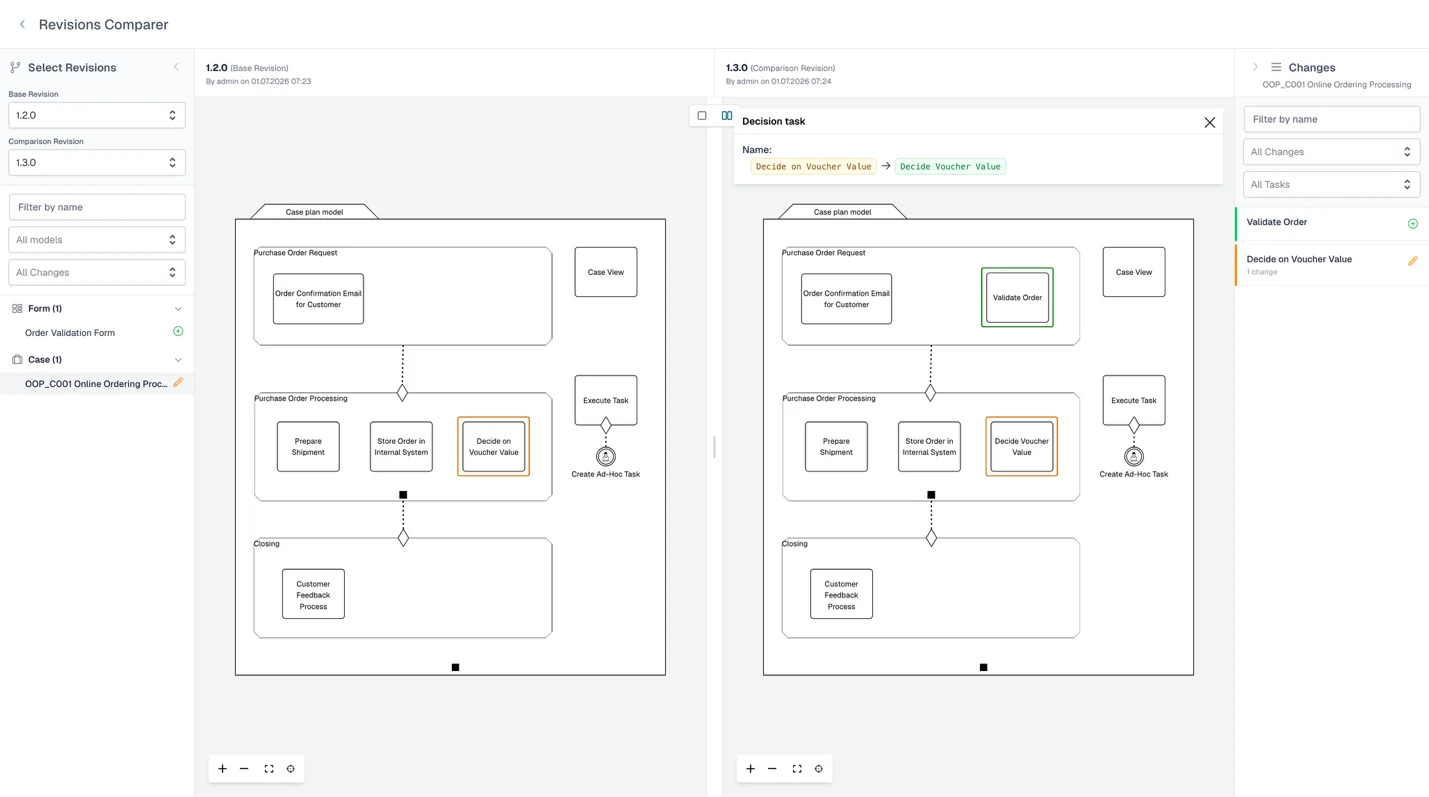
Comparing two app revisions in Flowable Design: added elements in green, changed elements in orange, with a per-model list of changes
For a full overview of all the Agentic AI and automation features of the 2026.1 release have a look at https://release.flowable.com/2026.1/themes/governance/. The other features that are also included in this release are:
App deployment pipeline: governs the path your models take from authoring to production. Approval workflows decide when a change is allowed to move forward, revisions keep every release identifiable, and environment-specific controls determine how and when models reach each target environment.
Advanced access control in Design: control who can create, edit, publish and unlock models, from the UI.
Assisted case and process migration in Hub: migrate running hierarchies in batches with shared mappings and a clear view of what changes.
Most of the information a business actually runs on doesn't arrive as clean and tidy structured records. It comes as an email with three attachments (one a picture of a dog mistakenly added), a scanned handwritten form or a contract someone dropped into a folder. Traditionally that data often sits outside the process: a person reads it, interprets it, and types the relevant parts into a system before anything can happen. This was already possible with Flowable before, and 2026.1 makes it easier and natively integrated: you can now pull that data inside a case or process and involve people, agents or services, with the same audit trail and control as any other input.
With email and attachments as native content items, an incoming message and every attached file are captured automatically on arrival, each becoming its own content item and persisting to the case and process variables. They are now reviewable in the attachments table through a dedicated email view that renders the original message alongside the captured files. Incoming emails can be mapped automatically to content models, or you can instead hand them to a document agent that classifies each and extracts its structured fields on arrival.
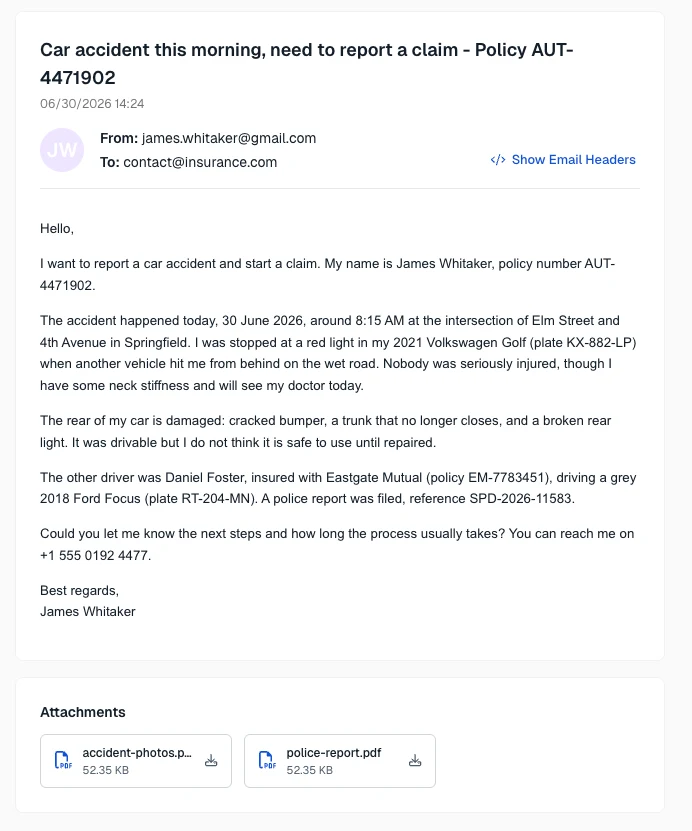
The email detail view in Flowable Work: the message is shown, with each attachment captured as its own document
Once a document is added to a process or case, historically, it took manual work and time to get the relevant information into structured fields. The new AI-assisted form prefill now does that reading for the user: documents uploaded are passed to a document agent that extracts the relevant values and proposes them against the form's fields, with a separate mapping per content model so different document types can fill different sections. Values arrive field by field to accept or reject, existing entries are marked rather than overwritten, and where a document offers more than one plausible value the user picks between candidates instead of trusting a single guess. In the end, the LLM does the tedious extraction, but the values land in the case or process where a human stays in control of what is written.
Uploading a document and confirming AI-proposed form values
Lastly, new event types to handle anything around documents have been added to the BPMN and CMMN capabilities. A process or case can now natively react to a content item being created, renamed, moved or deleted, through document start, intermediate catch and boundary events in BPMN, and event listeners and case-start triggers in CMMN. For example, a file landing in a folder can start a case, and a document moved out from under an in-progress review can interrupt it and route for clarification.
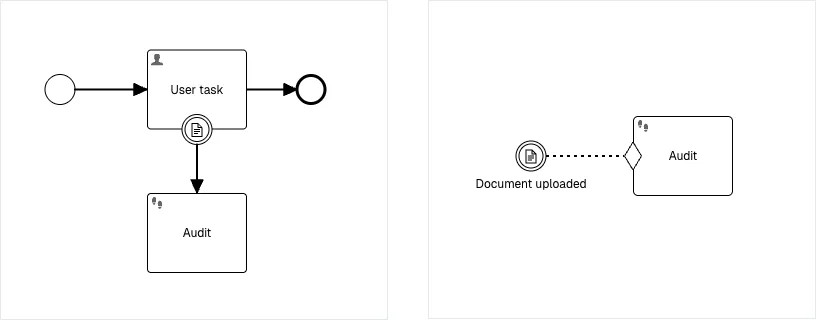
Document events in BPMN (a document boundary event on a user task) and CMMN (a document event listener), each triggering an audit step
Each of these is deeper than there's room for here, from the per-channel classification choices on inbound mail to the full set of document event types in BPMN and CMMN. The feature pages walk through the configuration and worked examples for each:
Email handling: https://release.flowable.com/2026.1/features/email-to-content-items/
AI form prefill: https://release.flowable.com/2026.1/features/ai-form-prefill/
Native document events: https://release.flowable.com/2026.1/features/document-events/
We've covered the new AI features, the improvements to governance and testing, and unstructured data. That leaves one final topic for this release blog: the improvements to accessibility and operations.
The UI of Work has been brought up to the WCAG 2.2 AA accessibility standard. This is a broad compliance effort across the Work UI rather than a single screen, covering how people perceive, navigate and operate the application without relying on a mouse or on sight alone.
This means clearer keyboard navigation, robust screen-reader support, sufficient color contrast, and consistent, predictable interactions throughout the interface. And this isn't a self-assessment: our conformance has been independently verified by an external accessibility auditor, giving our customers and prospects documented assurance that the UI of Work meets the bar.
Flowable Hub, a React-based administration console, is now available for customer-managed setups. This positions Hub as the successor to Flowable Control. The release also adds operational observability and resilience features that land in Hub, and at the platform level, so teams running Flowable themselves get clearer insight into what the engine is doing and steadier behavior under load.
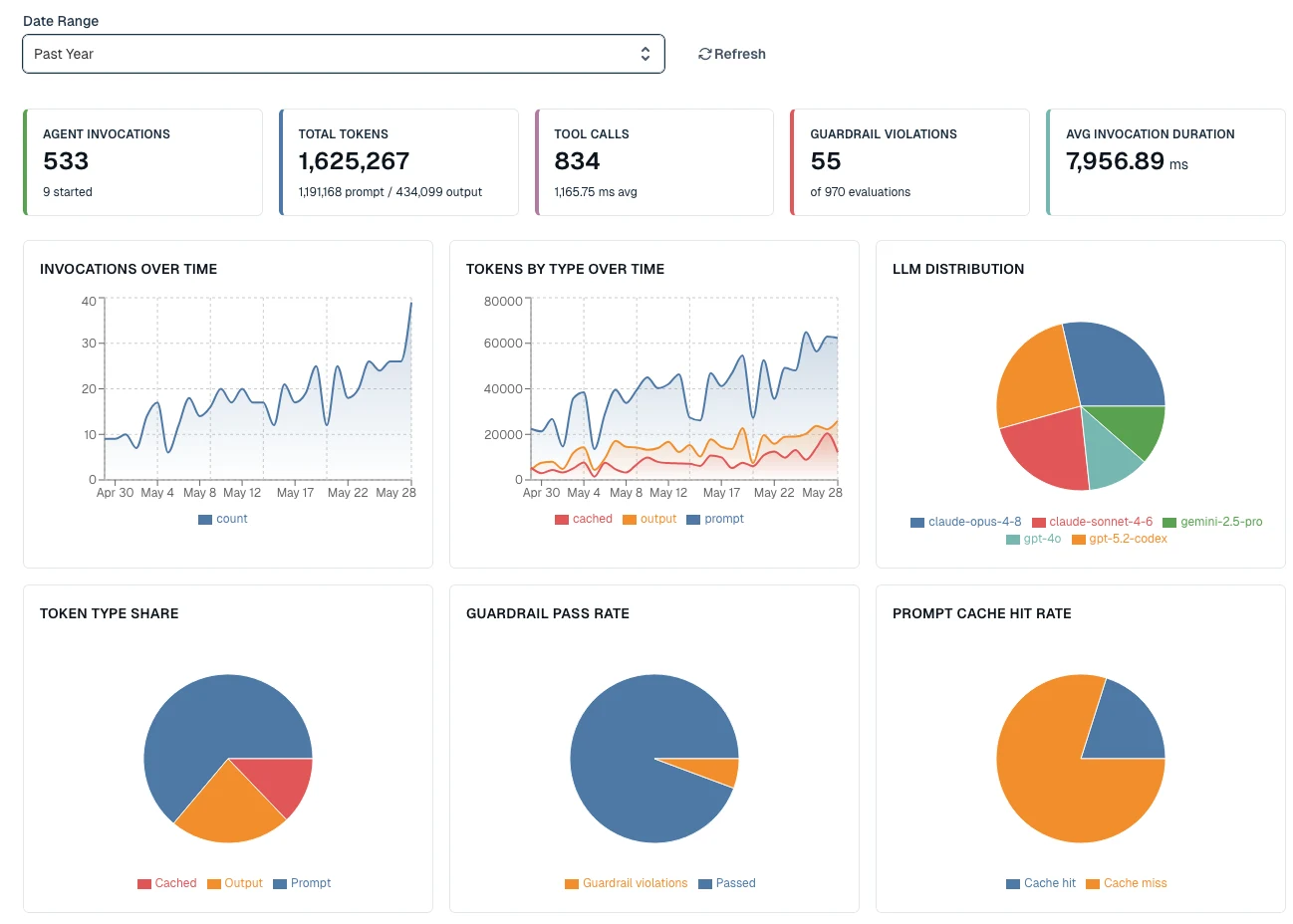
Agent operations dashboard in Flowable Hub
Customers can still use Flowable Control within 2026.1, but Flowable Control is deprecated because its user-interface frameworks have reached end-of-life and no longer receive security updates from their maintainers. As a result, vulnerabilities originating in these frameworks cannot be remediated. Flowable Hub is built on an actively maintained technology stack and is the supported path forward.
End of Support: Flowable Control receives limited maintenance support until Dec 31, 2027. During this period, Flowable provides fixes for defects and security vulnerabilities in Flowable’s own code and in third-party dependencies for which upstream fixes are available. Vulnerabilities originating in third-party dependencies that are not maintained anymore are outside the scope of support, as no upstream fixes exist. After Dec 31, 2027, Flowable Control is no longer supported in any form.
Whether you're handing work to agents or hardening the processes you already are running, 2026.1 comes down to the same thing: being able to trust what runs inside the cases and processes. Agents gain guardrails, evaluators and open LLM support, so you can hand them real work and rely on the result. Email and documents become structured input your processes can act on. Git, deployment pipelines and in-Design testing bring modeling under the control that business and engineering teams expect, while new plugin capabilities and typed contracts keep models scaling cleanly. And across the platform, everything is more accessible and readier to operate. Build, run, operate, improve: every stage moves forward.
The agentic features are the obvious focus of this release, but an agent you can't test, version, or roll back isn't one you'll put near a real business process. That's what this release is for.
Flowable already runs high-stakes work at scale, millions of cases and processes in production, in regulated industries where mistakes are expensive. Agents only belong in that environment if they're held to the same standard, and that's what 2026.1 is built to do.
Explore the release further below.
- Plugins that bundle whole models: Flowable plugins can now bundle BPMN and CMMN models in addition to services. That means an entire reusable workflow or case model can be packaged as a plugin and shared, rather than copied, across teams. A plugin task can reference processes and cases, so a single packaged capability can pull in whatever combination of models a team needs to reuse.
- Out-of-the-box Camel connectors: Flowable now ships a set of ready-to-use integration connectors built on Apache Camel, so a process or case can send and receive data over common transports without custom integration code or a separate integration layer. This release delivers connectors for File, FTP/SFTP, SQL databases and Azure Service Bus.
Each connector is configured as an inbound or outbound channel in Flowable Design and runs on the platform, so integrations are modeled and governed in the same place as the rest of your work.
- Variable & ERD views in Design: see the variables a model reads/writes and your data dictionary as an ER diagram, without leaving the editor.
- Typed inputs & outputs: declare what a model expects and produces, surfaced wherever it's reused.
- Service registry upgrade: generate from OpenAPI 3.1, multipart/form bodies, flexible auth, caller-identity pass-through and integrated mocking for REST services.

Master the complexity vortex with Flowable 2025.2. Explore AI agent orchestration, impact analysis, and governed work for fast regulated enterprise workflows.

Unleash intelligent AI agent orchestration for enterprise automation. Elevate AI with built-in governance, and scale adoption outside of silos.
From modelling complete applications with generative AI prompts, to integrating AI service calls directly within case or process models, Flowable 3.17 is also packed with improved UX features and WhatsApp Cloud API connectivity.